Setting a Face Match Threshold: Why One Number Doesn't Fit Four Tools
Quantilence ships four different default match thresholds — 0.75, 0.85, 0.9 and 0.98. This is what each one is protecting against, and how to pick your own.
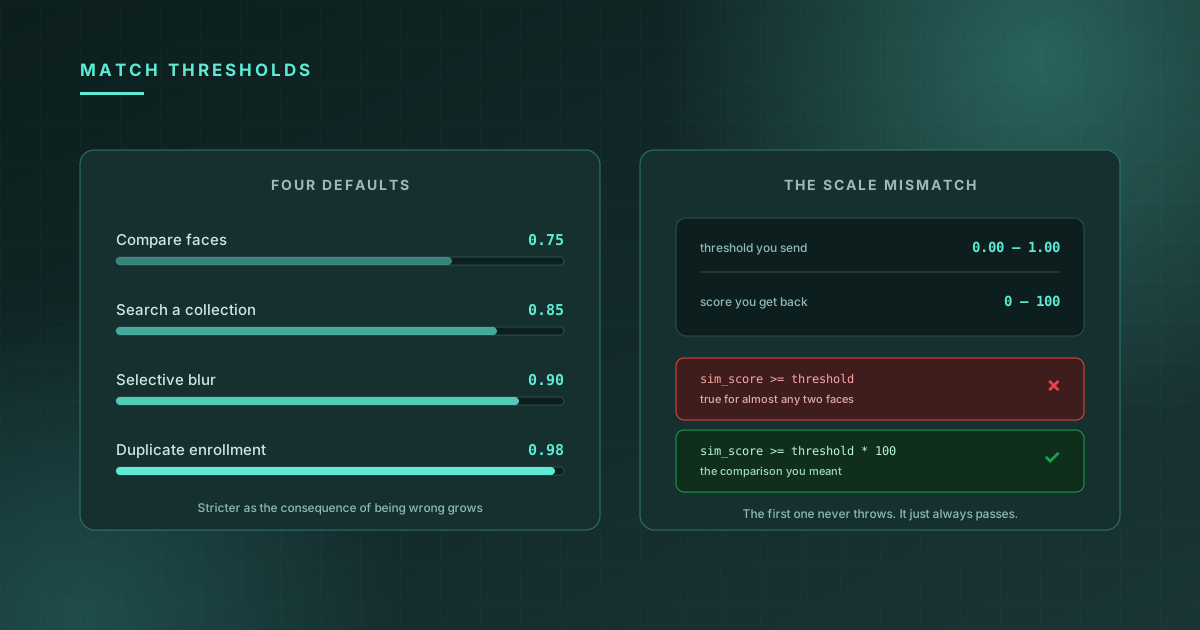
Every face matching API gives you one knob: a threshold, somewhere between 0 and 1, above which two faces count as the same person. It looks like a single setting with a single right answer.
It isn't. Quantilence ships four different defaults across its tools — 0.75, 0.85, 0.9 and 0.98 — and the spread isn't inconsistency. Each one is protecting against a different failure, and the number that's right for comparing two photos is wrong for searching a collection of ten thousand.
This post is what each default is doing, and how to choose your own.
First, the scale mismatch that catches everyone
The threshold you send is a float from 0.0 to 1.0. The score you get back is a number from 0 to 100.
const { sim_score } = result.similarity[0];   // 98.7
const threshold = result.threshold;           // 0.75

// Wrong: 98.7 >= 0.75 is true for almost any pair of faces
const isMatch = sim_score >= threshold;

// Right
const isMatch = sim_score >= threshold * 100;
The wrong version doesn't throw. It returns true for essentially every comparison you will ever make, including two photos of different people, and it keeps doing so in production until somebody notices that the fraud check never fails. If you take one thing from this post, take the * 100.
The four defaults
| Tool | Endpoint | Default | What it is guarding |
|---|---|---|---|
| Compare faces | /v1/face-similarity/match | 0.75 | One comparison, one chance to be wrong |
| Search a collection | /v1/face-search/query | 0.85 | Every enrolled face gets its own chance to be wrong |
| Blur faces (selective) | /v1/face-blur/process | 0.9 | An irreversible edit to someone's photo |
| Duplicate enrollment | /v1/face-search/check-duplicate | 0.98 | Admitting a second record for the same person |
0.75 — comparing two photos
A 1:1 comparison asks one question and gets one answer. There's exactly one opportunity for a false match, so the bar can sit where it balances the two error types reasonably for a typical selfie-to-ID flow.
0.85 — searching a collection
This is the one people get wrong by assuming it should match the 1:1 number.
When you search a gallery, every enrolled face gets its own independent opportunity to clear your threshold. A cutoff that produces an acceptable false-match rate against one comparison produces a much worse one against ten thousand, because you are effectively running ten thousand comparisons and keeping the best. The risk scales with the collection; a fixed threshold does not.
So 1:N starts stricter than 1:1, and if your collection is large or still growing, 0.85 is a floor rather than a recommendation.
0.9 — selective blurring
mode=except_enrolled blurs every face except the people you've enrolled; mode=only_enrolled blurs only them. Both use recognition to decide, and both then write pixels.
The asymmetry here is not between two error rates, it's between two kinds of harm. Getting it wrong in one direction leaves an unblurred face in a photo you were publishing specifically to anonymise it. You cannot un-publish that. The default sits high because the output is an edit, not a score you can reconsider.
0.98 — duplicate detection
Deciding that an incoming face is already enrolled is a different question from deciding that two faces match. A false positive here refuses a legitimate new enrollment; a false negative splits one person across two identities, which quietly corrupts every search that follows.
The number is deliberately extreme, and it's calibrated rather than raw — a note in face_search.py records that 0.98 on the current scoring corresponds to roughly 0.85 on the older raw one. Which is the real lesson: a threshold is only meaningful against the scoring it was measured on. Carrying a number across a model change, or in from another vendor's documentation, carries nothing.
Choosing your own
The defaults are starting points. Three things decide where yours should sit, and none of them is a property of the model.
Which error costs more. Raising the threshold trades false accepts for false rejects. A false accept in payment onboarding is fraud. A false reject in a photo-library feature is a mild annoyance. These are not the same problem and should not land on the same number.
What happens to borderline cases. If scores near the line go to a human, you can afford a tighter threshold, because the cost of a false reject is a review rather than a lockout. If the decision is fully automatic, every rejection is final and the threshold has to carry the whole decision by itself.
Your own data. Faces from a controlled enrollment kiosk and faces from user-uploaded phone photos do not produce the same score distribution. Run a few hundred of your own known-matching and known-non-matching pairs, look at where the two groups actually sit, and put the line in the gap. This is an afternoon of work and it beats every published number, including the ones above.
Why there's no accuracy table here
You will find posts in this category that print precise false-accept and false-reject rates at each threshold. We're not going to, because those figures are only true for the dataset they were measured on, and that dataset is almost never yours.
Published benchmarks are run on curated academic sets: consistent lighting, frontal poses, good resolution. Real traffic has none of that. A rate measured on clean data tells you how the model ranks against other models. It does not tell you what will happen to your users, and quoting it as though it does is how a threshold ends up chosen by a marketing page.
Measure on your own data. The result will be less flattering and considerably more useful.
Two things worth doing regardless
Store the score, not the verdict. Log the sim_score, not just whether it passed. The day you want to retune, or to answer a dispute about a decision made three months ago, the raw number is the only thing that makes either possible. A stored boolean tells you nothing you can act on.
Watch the gap, not just the top score. In a collection search, a top match at 99 with a runner-up at 10 is a different situation from a top match at 99 with a runner-up at 85, even though both clear any sane threshold. The second one deserves a second look.
You can try any of this without writing code — Compare faces and Search a collection both run in the browser, and the response includes the threshold that was applied. For what happens when an image has no face at all, or several, see handling zero and multiple faces.