No Face Detected: Handling Zero and Multiple Faces in a Face API
What a face API actually returns when a photo has no face in it, or four — and why the answer is different for each tool, including which failures still cost you an operation.
Most face API integrations are written against the happy path: one clear face per image, a score comes back, you compare it to a threshold. Then real users start uploading photos, and a meaningful share of them contain no face at all, or a face plus three strangers in the background.
How the API behaves at that moment is rarely in the quickstart, and the three Quantilence face tools genuinely do behave differently. This post is what each one does, why, and the one case that fails silently rather than loudly.
Three tools, three behaviours
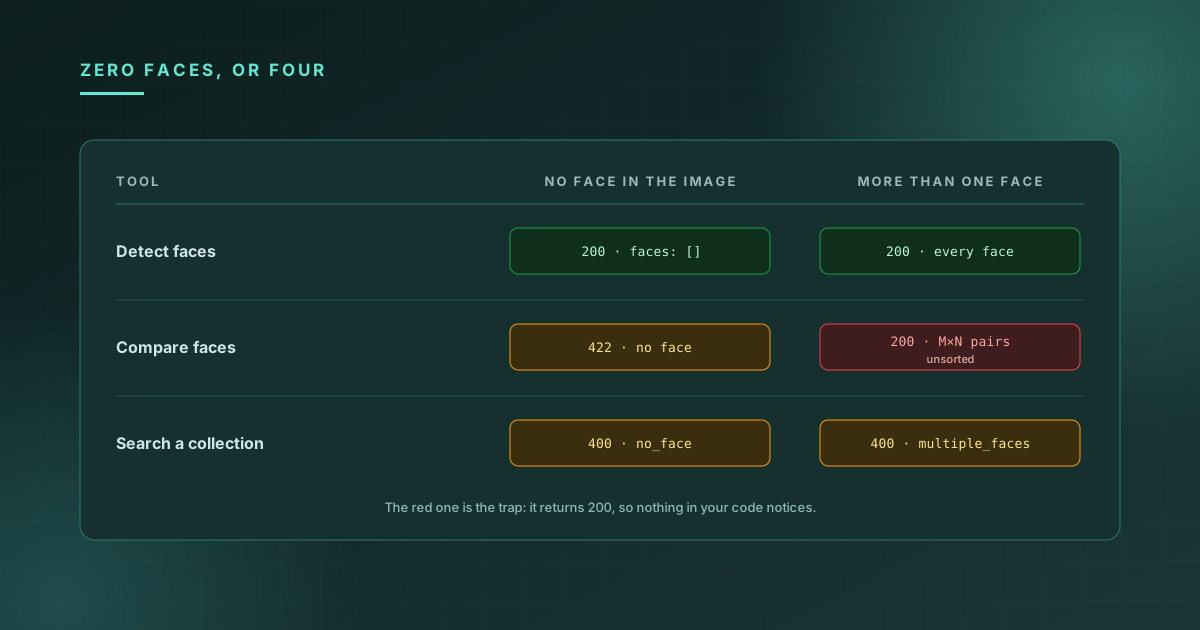
| Tool | Zero faces | More than one face |
|---|---|---|
| Detect faces | 200 with an empty faces array | 200, every face returned |
| Compare faces | 422, detail: "No faces detected in image 1" | 200 — and see below |
| Search a collection | 400, code: "no_face" | 400, code: "multiple_faces" |
Detection treating "no faces" as a successful answer is the correct behaviour for a detector — zero is a legitimate count, not an error. The other two reject it, because "is this the same person" has no meaningful answer when there's nobody to compare.
Search rejects multiple faces outright. If a query image contains four people, there is no defensible choice of which one to search for, so it declines rather than guessing:
{
  "detail": {
    "code": "multiple_faces",
    "message": "Multiple faces detected. Please upload a single-face image."
  }
}
Note the shape — detail is an object with a code, not a string. Branch on code, not on the message text, which is written for humans and can change.
The one that doesn't fail loudly
Compare faces does not reject multi-face images. It compares every face in the first image against every face in the second and returns all of the pairs:
{
  "success": true,
  "similarity": [
    { "face_1_name": "image1", "face_2_name": "image2", "sim_score": 12.4 },
    { "face_1_name": "image1", "face_2_name": "image2", "sim_score": 98.7 }
  ],
  "image1_face_count": 1,
  "image2_face_count": 2,
  "threshold": 0.75,
  "processing_time_ms": 142
}
One face against two produces two pairs. Two against three produces six. And here is the part that quietly breaks integrations:
The pairs are returned in detection order, not score order.
There is no sort. The service iterates the faces of image 1 in the outer loop and image 2 in the inner one, appending as it goes, so position zero is simply "first face found in image 1 against first face found in image 2" — which the detector decided, not the model.
Which makes this wrong:
// Wrong whenever either image has more than one face
const { sim_score } = result.similarity[0];
const isMatch = sim_score >= result.threshold * 100;
In the response above, similarity[0] is the 12.4 — a real person compared against a stranger standing behind them. The actual match, at 98.7, is in position one. Your code rejects a legitimate user and reports a confident-looking score for having done so.
It is worth being precise about how bad this is: it does not throw, it does not warn, and it is correct for every single-face test image you will use while building. It only misfires on exactly the inputs you didn't test with.
The fix, if you want one answer from a possibly-crowded photo:
const best = result.similarity.reduce((a, b) => (b.sim_score > a.sim_score ? b : a));
const isMatch = best.sim_score >= result.threshold * 100;
Though "take the highest" is itself a product decision, not a default. Searching a crowd for the best available match is right for a photo-library feature and wrong for identity verification, where an image containing four faces should usually be refused the way Search refuses it.
Guard on the counts
Every successful comparison tells you how many faces it found:
if (result.image1_face_count !== 1 || result.image2_face_count !== 1) {
  // Ask for a retake. Don't report a similarity score.
}
For identity flows, treat "exactly one face in each image" as a precondition rather than an edge case. A score computed against the wrong face in a group photo is not a weak signal — it's a confident answer to a question nobody asked.
Some failures still cost an operation
This one is worth knowing before it shows up on your usage page.
A no-face answer costs an operation. So does multiple_faces from Search. Both are failures from your point of view, and both are charged.
The line billing draws is not success versus failure — it's model answer versus request we couldn't use. "I decoded both of your images, ran the detector, and there was nothing there" is a real answer produced by real work. A malformed body, an unsupported file type or an image that won't decode never reaches the model, and those are free.
So these are not charged, even though they're all errors:
400  Could not decode image — unsupported format or corrupt file
400  unknown_mode / unsupported_type / empty_image
413  file too large
429  out of operations
5xx  our fault, always free
And these are, even though you got no usable result:
422  No faces detected in image 1          (Compare faces)
400  no_face / multiple_faces              (Search a collection)
Practically:
- Validate before you call. A client-side check that the file decodes and is plausibly a photo costs nothing and avoids the charge entirely.
- Don't retry a no-face error. The answer will not change, and every attempt is billable.
- Surface it as its own outcome in your UI. "We couldn't find a face in that photo — try one taken straight on, in better light" recovers a user. "Verification failed" sends them to support.
Pre-checking isn't free either
The obvious design is to call Detect faces first, confirm exactly one face, then call Compare. It's a clean pipeline and it does prevent the multi-face trap.
It also doubles your cost, because detection is a billable operation like any other. For a high-value, low-volume flow — onboarding, KYC — that's usually worth paying. For a bulk job over thousands of images it is not, and reading image1_face_count off the comparison you were going to make anyway gets you the same guard for one operation instead of two.
The short version
- Detect faces returns an empty array for an empty photo. Zero is a count, not an error.
- Search a collection refuses both zero faces and several, with a
codeto branch on. - Compare faces refuses zero but happily compares a crowd, returning every pair unsorted. Never trust
similarity[0]. - Check
image1_face_countandimage2_face_counton every comparison that matters. - A no-face answer is a billed operation on either tool, because the detector ran. Don't retry it.
All three run in the browser without an integration — Detect faces, Compare faces and Search a collection. Drop in a group photo and watch the pair count grow. For picking the cutoff those scores are compared against, see setting a face match threshold.